Ardor Cloud

Ardor Cloud

2025

Product Strategy, UI/UX, Prototyping

Founding Product Designer

TL;DR

Founding Product Designer at Ardor, leading the design of an AI-native platform for building and running production-grade software.

I owned the core product experience end-to-end, from UX strategy and AI interactions to UI systems, research, and execution. This shaped how users plan, build, deploy and manage applications without needing deep AI or infrastructure expertise.

Founding Product Designer at Ardor, leading the design of an AI-native platform for building and running production-grade software.

I owned the core product experience
end-to-end, from UX strategy and AI interactions to UI systems, research,
and execution. This shaped how users plan, build, deploy and manage applications without needing deep AI or infrastructure expertise.

PROBLEM

Fragmented experience and AI opacity

Fragmented experience and
AI opacity

When I joined, Ardor was already powerful, but difficult to reason about.

  • UI patterns varied widely across pages

  • Users had to constantly re-learn layouts and navigation

  • AI copilot felt "magical" but opaque

  • As features grew, complexity outpaced user understanding

When I joined, Ardor was already powerful, but difficult to reason about.

  • UI patterns varied widely across pages

  • Users had to constantly re-learn layouts and navigation

  • AI copilot felt "magical" but opaque

  • As features grew, complexity outpaced user understanding

Without intervention, the product would become intimidating, especially
for non-expert users.

Without intervention, the product would become intimidating, especially for non-expert users.

Without intervention, the product would become intimidating, especially
for non-expert users.

Design Evolution

1

Early Prototype

This is what the UI looked like when I first joined. An experimental, Miro-like canvas focused on collaboration and ideation.

Powerful, but fragmented, with inconsistent layouts and side panels across the platform.

This is what the UI looked like when I first joined. An experimental, Miro-like canvas focused on collaboration and ideation. Powerful, but fragmented, with inconsistent layouts and side panels across the platform.

1

Early Prototype

This is what the UI looked like when I first joined. An experimental, Miro-like canvas focused on collaboration and ideation. Powerful, but fragmented, with inconsistent layouts and side panels across the platform.

2

Unified system

Standardized panels, layouts, and navigation into a cohesive UI system.

Redesigned chat and Copilot interactions to improve transparency and user trust.

Standardized panels, layouts, and navigation into a cohesive UI system. Redesigned chat and Copilot interactions to improve transparency and user trust.

Standardized panels, layouts, and navigation into a cohesive UI system. Redesigned chat and Copilot interactions to improve transparency and user trust.

3

Layered Experience

Evolving toward a mode-based platform that adapts to user intent.

Complexity is progressively revealed across planning, exploration, and execution.

Evolving toward a mode-based platform that adapts to user intent. Complexity is progressively revealed across planning, exploration, and execution.

Evolving toward a mode-based platform that adapts to user intent. Complexity is progressively revealed across planning, exploration, and execution.

Problem + Requirements

One of the strongest signals we heard from users was that Ardor felt overwhelming.

The experience was scattered across multiple tools and surfaces, causing users to explore the platform instead of focusing on building.


Our goal was to design a single, unified workspace where the entire journey — from ideation to deployment — could happen in one place, without forcing users to context-switch or mentally map between tools.


This meant clearly defining the core building blocks of the platform and allowing them to reconfigure based on what the user was trying to do.

This visual shows how the core building blocks came together.

DESIGNING FOR THE AGENTIC EXPERIENCE

My Design Principles

These principles guided every major decision I made:

Transparency over magic - AI should explain itself

Progressive disclosure - users grow into power

Mental models first - design how people think, not how systems are built

Consistency compounds - repeated patterns reduce cognitive load

Transparency over magic -
AI should explain itself

Progressive disclosure -
users grow into power

Mental models first - design how people think, not how systems are built

Consistency compounds - repeated patterns reduce cognitive load

DESIGN DECISION #1

Platform-wide UX Unification

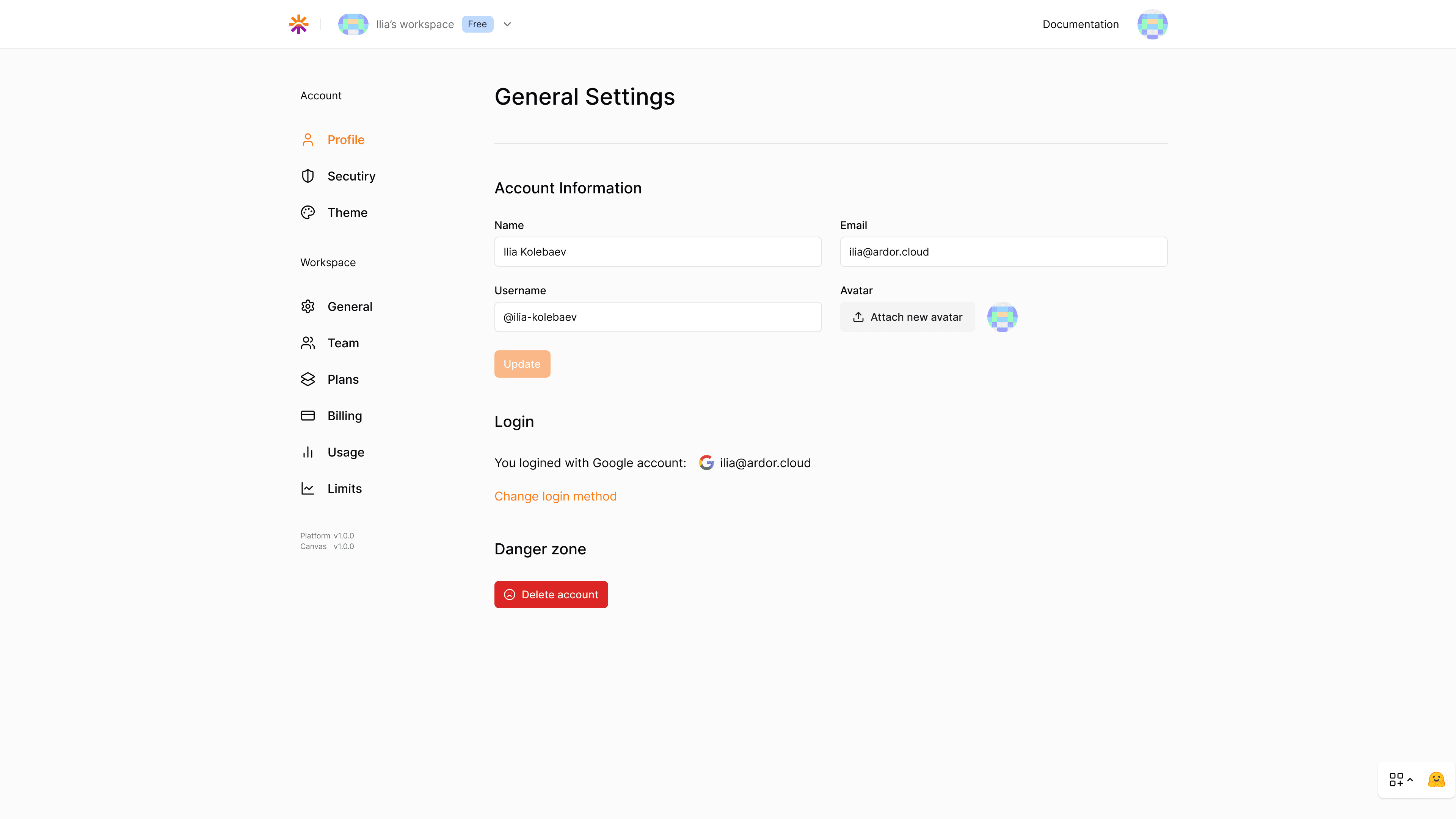
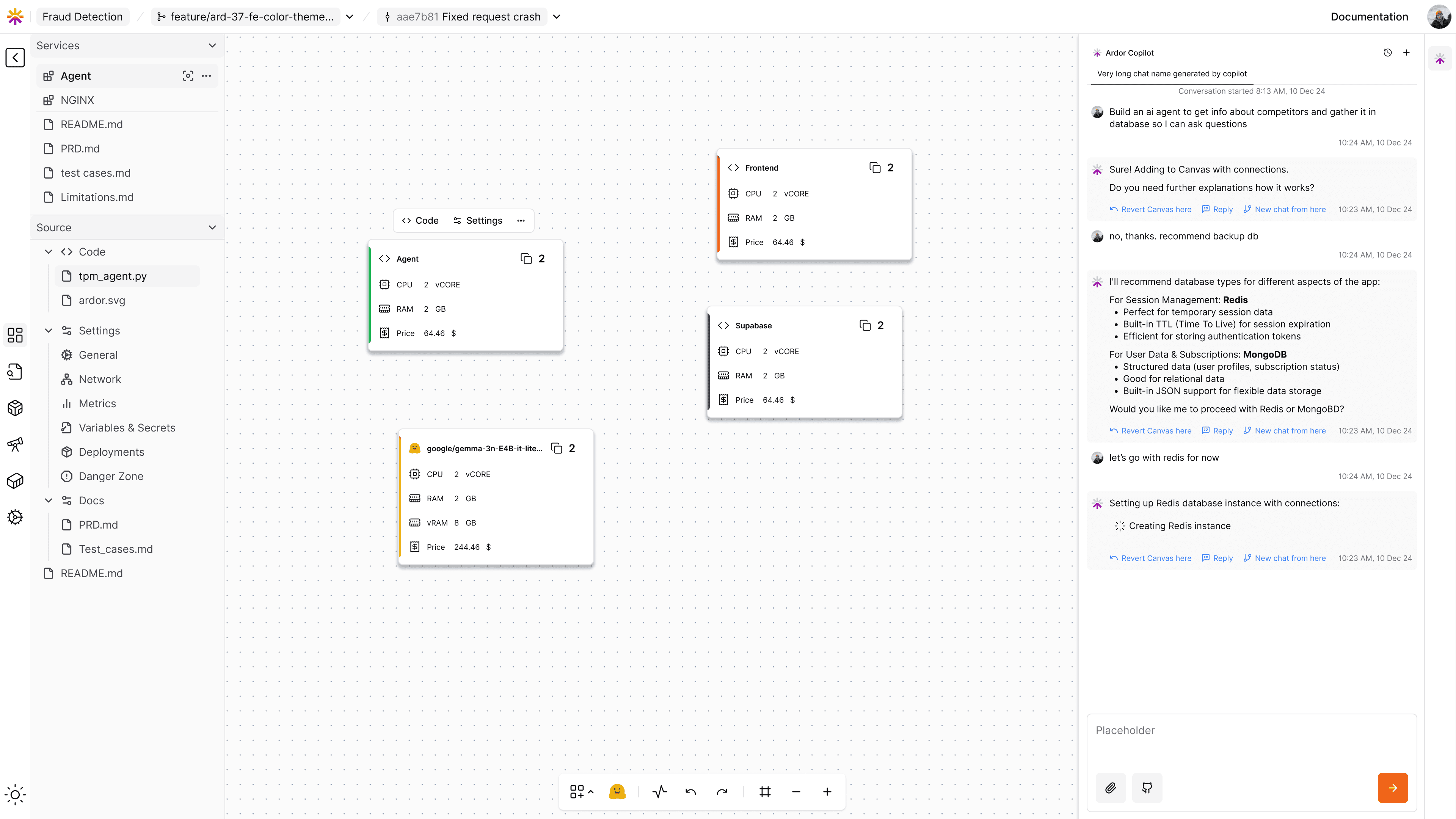
The product felt fragmented. Different pages used different side panel patterns, layouts varied between core workflows and settings, and there was no clear visual hierarchy to guide primary versus secondary actions. As a result, users spent more time orienting themselves than building.

I audited the entire product and introduced a standardized layout system that unified side panels, content areas, and configuration views. I also applied consistent interaction patterns across key surfaces, including services, deployment, billing, and settings, so users could rely on familiar behaviors as they moved through the platform.


This reduced cognitive switching across workflows and created a scalable foundation for future features. More importantly, it helped the product feel like a single, coherent system rather than a collection of disconnected tools.

ARDOR UI (BEFORE)

ARDOR UI (BEFORE)

ARDOR UI (BEFORE)

ARDOR UNIFIED UI (NEW)

ARDOR UNIFIED UI (NEW)

ARDOR UNIFIED UI (NEW)

DESIGN DECISION #2

Designing AI Chat & Copilot Interactions

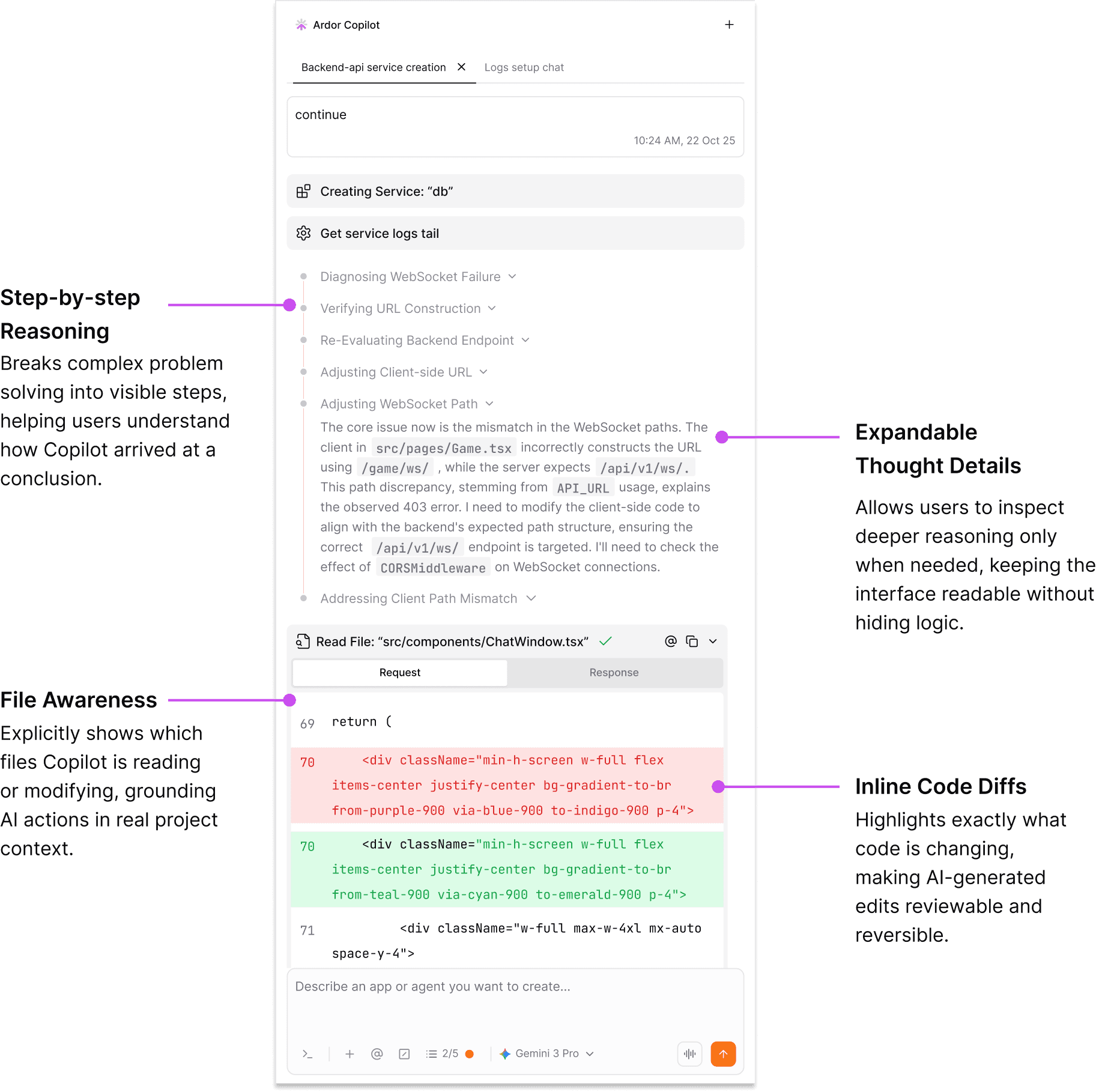
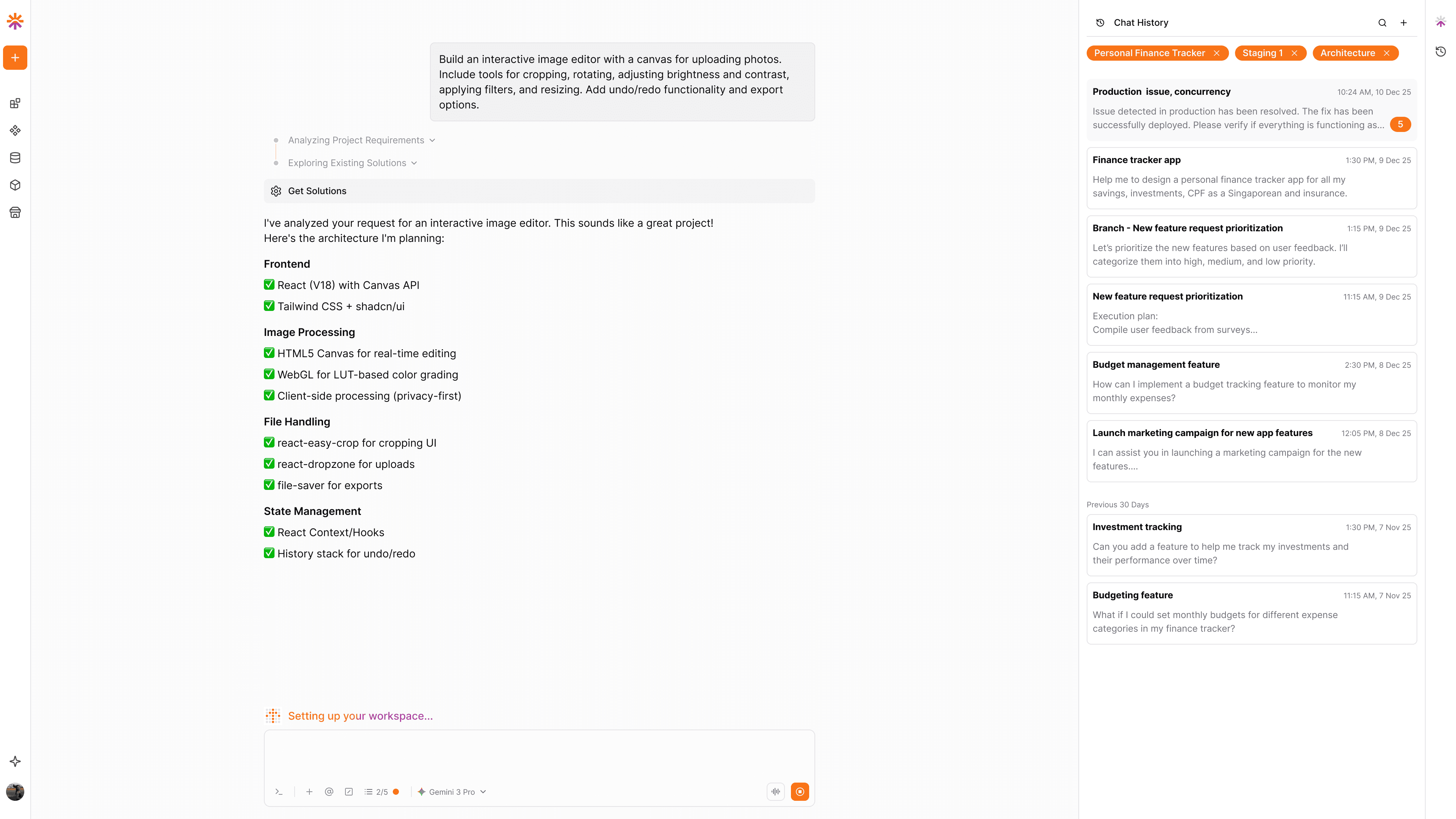
As Ardor’s AI capabilities expanded, Copilot became increasingly powerful but difficult for users to reason about. Users were often unsure what context the AI had, why certain actions were taken, or how to iterate when results weren’t quite right. The experience felt opaque, which reduced trust and confidence.


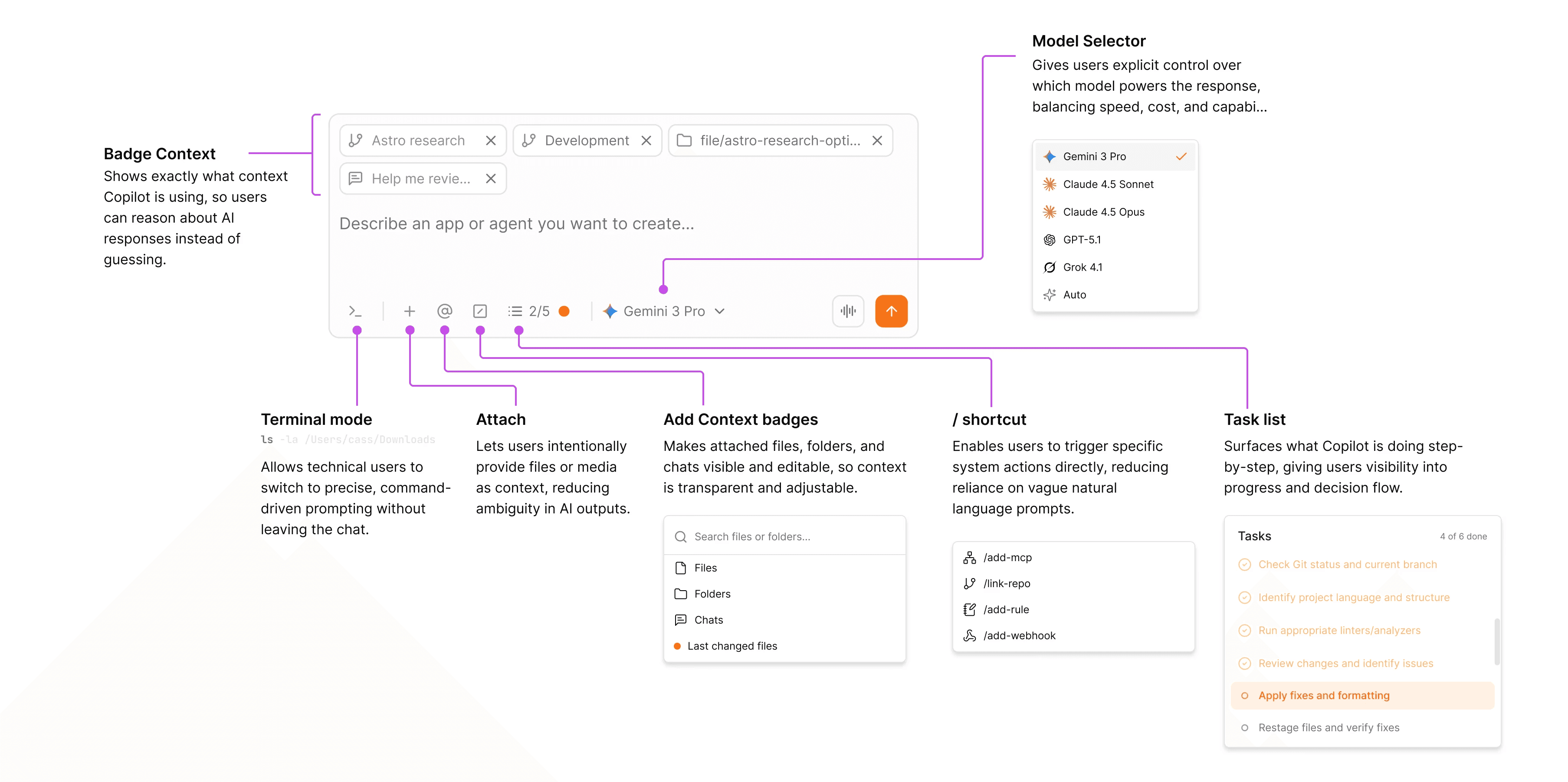
I redesigned the chat and prompt experience to function as a true interaction layer rather than a simple input box. This included improving prompt structure, making Copilot’s actions and reasoning more legible, and supporting clearer loops for iteration, correction, and exploration. The goal was to shift Copilot from a black box into a collaborative partner embedded in the workflow.


As a result, users gained greater clarity and control when working with AI. Copilot interactions became more transparent, trustworthy, and easier to build upon — reinforcing AI as an assistive collaborator rather than an unpredictable system.

REDESIGNED PROMPT BOX TURNS AI INTERACTIONS FROM A BLACK BOX, INTO A VISIBLE WORKFLOW.

REDESIGNED PROMPT BOX TURNS AI INTERACTIONS FROM A BLACK BOX, INTO A VISIBLE WORKFLOW.

REDESIGNED PROMPT BOX TURNS AI INTERACTIONS FROM A BLACK BOX, INTO A VISIBLE WORKFLOW.

Chat Panel

The chat panel evolved from a simple messaging interface into a control surface for AI-driven work.

By exposing progress, intermediate steps, and concrete outputs in context, the experience helps users stay oriented, intervene when needed, and build confidence in AI-assisted changes without breaking flow.

A key takeaway from Edulabs is the value of guided, customisable workflows
that help admins efficiently manage high-frequency tasks like term setup. Streamlining steps into an integrated workflow, bulk actions, robust filtering options, and flexibility in editing invoices allow admins to reduce errors and
overall friction.


For OClass, adopting and enhancing these practices is essential to deliver a
user-friendly experience for critical, recurring workflows.

The chat panel evolved from a simple messaging interface into a control surface for AI-driven work.

By exposing progress, intermediate steps, and concrete outputs in context, the experience helps users stay oriented, intervene when needed, and build confidence in AI-assisted changes without breaking flow.

DESIGN DECISION #3

Designing for Real Developer Workflows

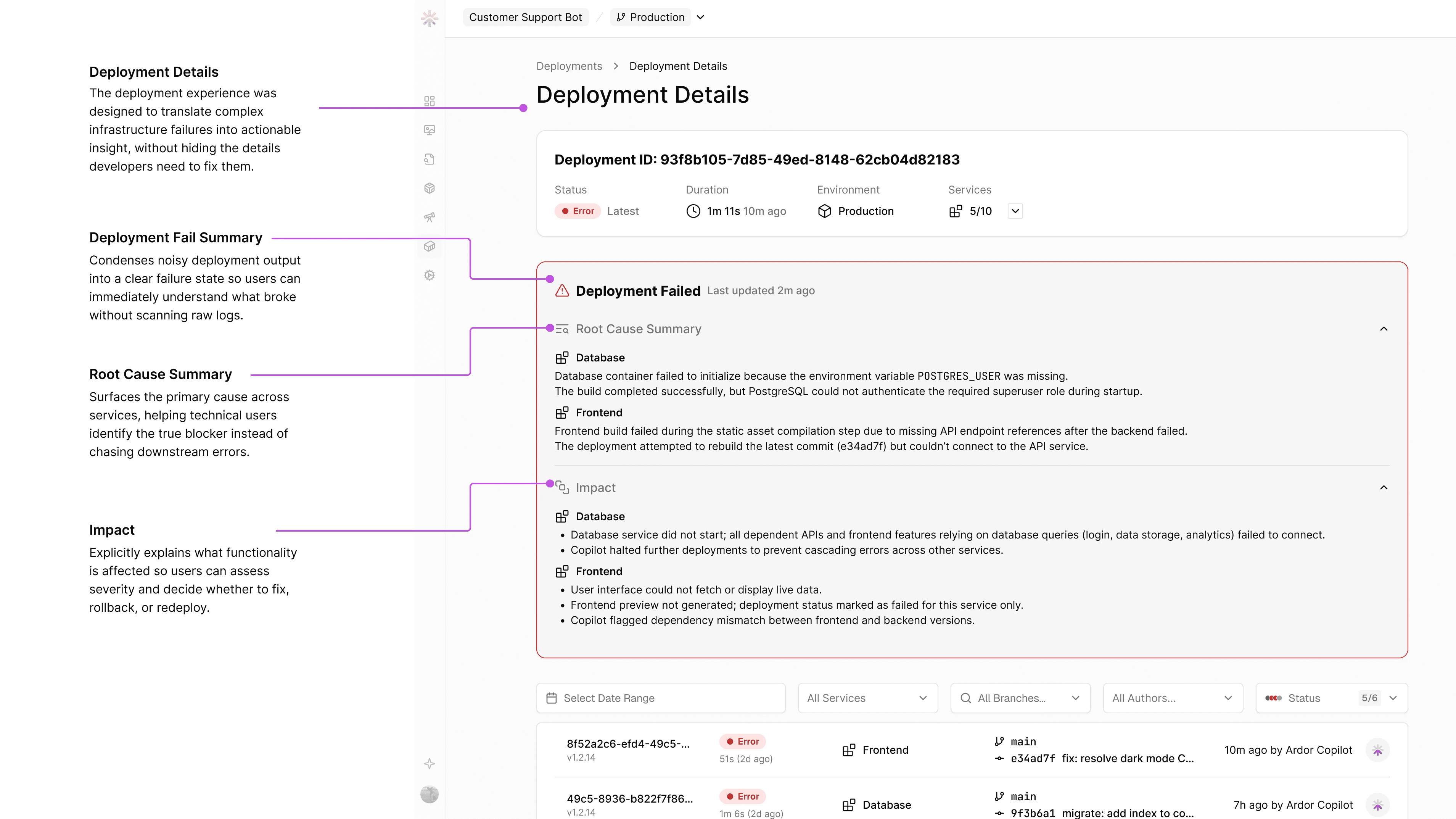
To design effectively for a platform that builds and runs real software, I needed to deeply understand the underlying systems. Ardor sits at the intersection of AI, infrastructure, and developer tooling, where poor abstractions can quickly break user trust.


I invested time in learning how large language models behave in practice, how GitHub-based workflows operate, and how deployment, observability, and billing function in production environments. I then translated this understanding into product designs for GitHub integration, deployment and logging views, and billing flows that balanced abstraction with necessary visibility.


This work grounded Ardor in real-world developer expectations. Users could move from experimentation to production with fewer surprises, while the platform maintained the simplicity required for less technical builders.

AI-ASSISTED DEPLOYMENT FAILURES, SUMMARISED FOR CLARITY WITHOUT LOSING TECHNICAL TRACEABILITY

AI-ASSISTED DEPLOYMENT FAILURES, SUMMARISED FOR CLARITY WITHOUT LOSING
TECHNICAL TRACEABILITY

AI-ASSISTED DEPLOYMENT FAILURES, SUMMARISED FOR CLARITY WITHOUT LOSING TECHNICAL TRACEABILITY

GitHub Integration

I designed the GitHub integration to align with developers’ existing mental models, making repository connection, syncing, and deployment feel familiar and predictable rather than abstracted or opaque. The experience balances automation with visibility, ensuring users understand what’s connected, what’s being synced, and how changes flow into production.

For deeper technical details, see the full documentation

A key takeaway from Edulabs is the value of guided, customisable workflows
that help admins efficiently manage high-frequency tasks like term setup. Streamlining steps into an integrated workflow, bulk actions, robust filtering options, and flexibility in editing invoices allow admins to reduce errors and
overall friction.


For OClass, adopting and enhancing these practices is essential to deliver a
user-friendly experience for critical, recurring workflows.

OVERCOMING OBSTACLES

User Research & Continuous Feedback

User research at Ardor is an ongoing, embedded part of the design process rather than a one-time phase. I regularly speak with users building real applications on the platform—from non-technical vibe coders to experienced developers—to understand where the experience currently feels empowering and where it still creates friction as the product evolves.


These conversations continue to surface recurring themes, including uncertainty around AI behavior, deployment failures, and complex UX. Insights from user interviews actively inform design decisions across the platform, shaping improvements to Copilot transparency and reliability and how can Ardor better integrate into our user's workflow. Instead of optimizing for isolated features, talking to our users help ensure the product evolves in step with how users actually think about building and shipping software.

Building a SaaS tool means constantly balancing user requests, true needs, and broader business goals, often amidst conflicting feedback and uncertainty. User interviews can be challenging, filled with resistance and noise, but staying focused
on the core objectives and asking the
right questions allowed us to uncover
genuine needs.

With every business having unique requirements, we approached solutions with creativity and empathy, aiming to deliver adaptable features that drive real impact.

This experience strengthened my ability to navigate ambiguity and align product decisions with strategic outcomes.

Building a SaaS tool means constantly balancing user requests, true needs, and broader business goals, often amidst conflicting feedback and uncertainty. User interviews can be challenging, filled with resistance and noise, but staying focused on the core objectives and asking the right questions allowed us to uncover genuine needs.
With every business having unique requirements, we approached solutions with creativity
and empathy, aiming to deliver adaptable features that drive real impact.


This experience strengthened my ability to navigate ambiguity and align product decisions
with strategic outcomes.

CURRENT FOCUS

 Turning ambiguity into shared direction

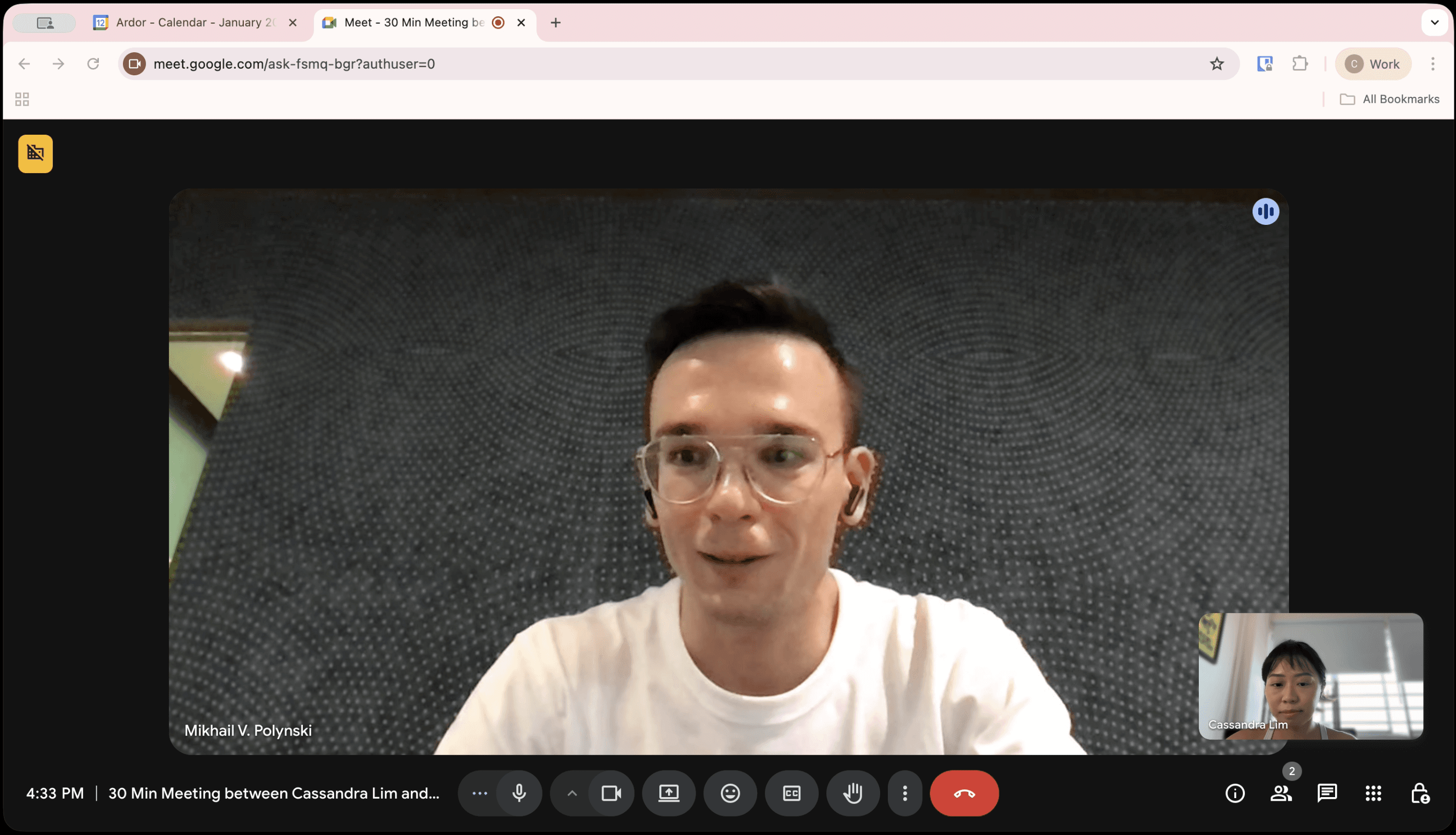
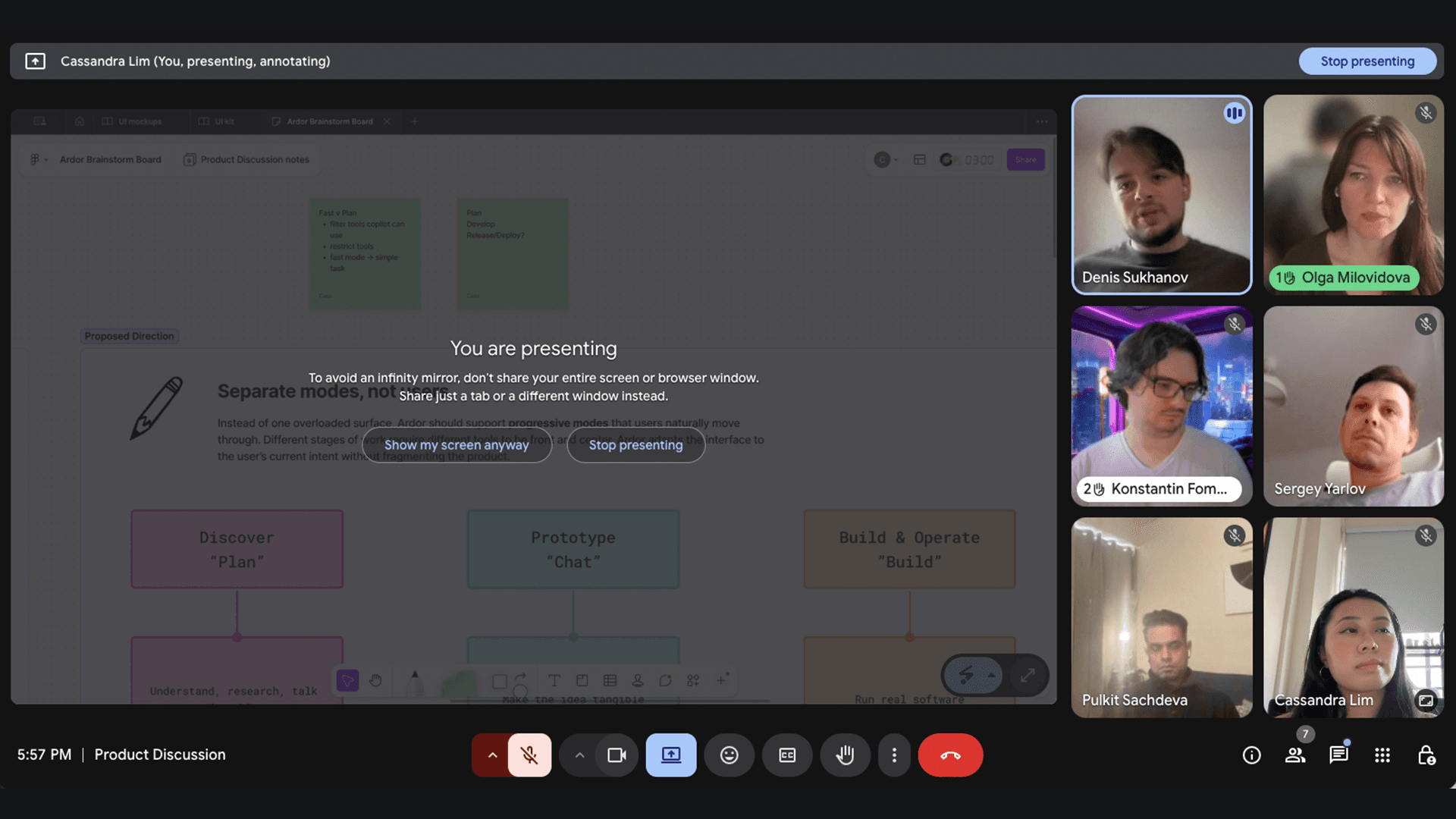
Brainstorm workshops at Ardor are treated as working sessions rather than discussions. As the only UX designer, I collaborate closely with engineers, founders, and marketing to sketch, prototype, and iterate in real time—collapsing feedback loops and turning ambiguity into concrete decisions. These sessions help align user needs, AI behavior, and technical constraints early, ensuring the product evolves through collective ownership rather than isolated handoffs.


My current focus is exploring a mode-based experience that layers complexity based on user intent. One insight became clear, different users need different levels of control at different moments (vibe coders vs technical builders), so we are experimenting with three evolving modes: Plan for ideation and AI collaboration, Design for shaping structure and flows, and Build for implementation, services, and deployment. While the naming and structure are still in flux, this direction reflects our ongoing effort to align with modern “vibe coding” workflows, reduce early overwhelm, and support users as they move from experimentation to production.

COLLABORATIVE BRAINSTORM WORKSHOPS

COLLABORATIVE BRAINSTORM WORKSHOPS

COLLABORATIVE BRAINSTORM WORKSHOPS

RETROSPECTIVE

What I learned designing an AI-native product

What I learned designing an
AI-native product

Over the past 6 months at Ardor, I've learned that designing for AI is less about novelty and more about responsibility. AI accelerates iteration and expands what users can build, but it also amplifies confusion when intent, context or system behaviour is unclear. The most impactful design work often came from slowing down to make AI actions legible so users could trust, steer and build alongside the system. Designing for AI ultimately means designing for evolving mental models, where clarity, control, and adaptability matter more than polished interactions alone.

AI has unlocked unprecedented possibilities within a single tool, requiring a rethink of traditional UI paradigms. Interfaces will become more dynamic and adaptive, shifting with user intent and context to maintain clarity, focus, and flow throughout the workflow.

As OClass moves forward with implementing the new class copy flow, the focus should extend beyond individual features to the broader business and product strategy. Successful product design requires ongoing alignment with business goals, by prioritising high-impact features, streamlining rollouts, and ensuring that every enhancement creates meaningful value for users.


The approach is rooted in driving measurable impact, not just at the feature level but
across the entire user journey and
operational workflow.

As OClass moves forward with implementing the new class copy flow, the focus should
extend beyond individual features to the broader business and product strategy.
Successful product design requires ongoing alignment with business goals, by prioritising
high-impact features, streamlining rollouts, and ensuring that every enhancement creates meaningful value for users.


The approach is rooted in driving measurable impact, not just at the feature level but across
the entire user journey and operational workflow.